Weight - Workouts - Progress
all in one app
Weightfolio
Weightfolio is a clean, private weight tracking solution. Enter your weight (or sync with smart scale), optionally attach a photo or note, and watch your trend on a clean dashboard with weight lost or gained, percentage change, and a projected finish date toward your goal.All on your device. No account. No ads.

App Description
Track your weight over time, see your progress at a glance, and connect it with the rest of your health data.Weightfolio is a simple, private weight log: enter your weight each day (or sync automatically from a smart scale), optionally attach a progress photo, add a note (also optional), and watch your trend on a clean dashboard with weight lost or gained, percentage change, and a projected finish date toward your goal.• Log weight with an optional note and photo for each entry• Track trends with an interactive chart, moving average, and streaks• Set a goal weight and watch your progress toward it• Auto-log from a smart scale — new Apple Health weigh-ins become entries automatically, with a simple choice of which to keep if two show up the same day• See your Apple Fitness activity next to each entry — rings, steps, and workouts, down to calories, distance, heart rate, and time of day• Back up your full history, photos included, to iCloud — or export/import as CSV• A Home Screen widget shows your current weight and trend at a glance• Daily reminders, in imperial or metric unitsEverything stays on your device and in your own private iCloud account. There's no login, no ads, and no data ever shared with anyone else.
Add Daily Weight Entries
Automatic Entries with Apple Health Sync + Smart Scale
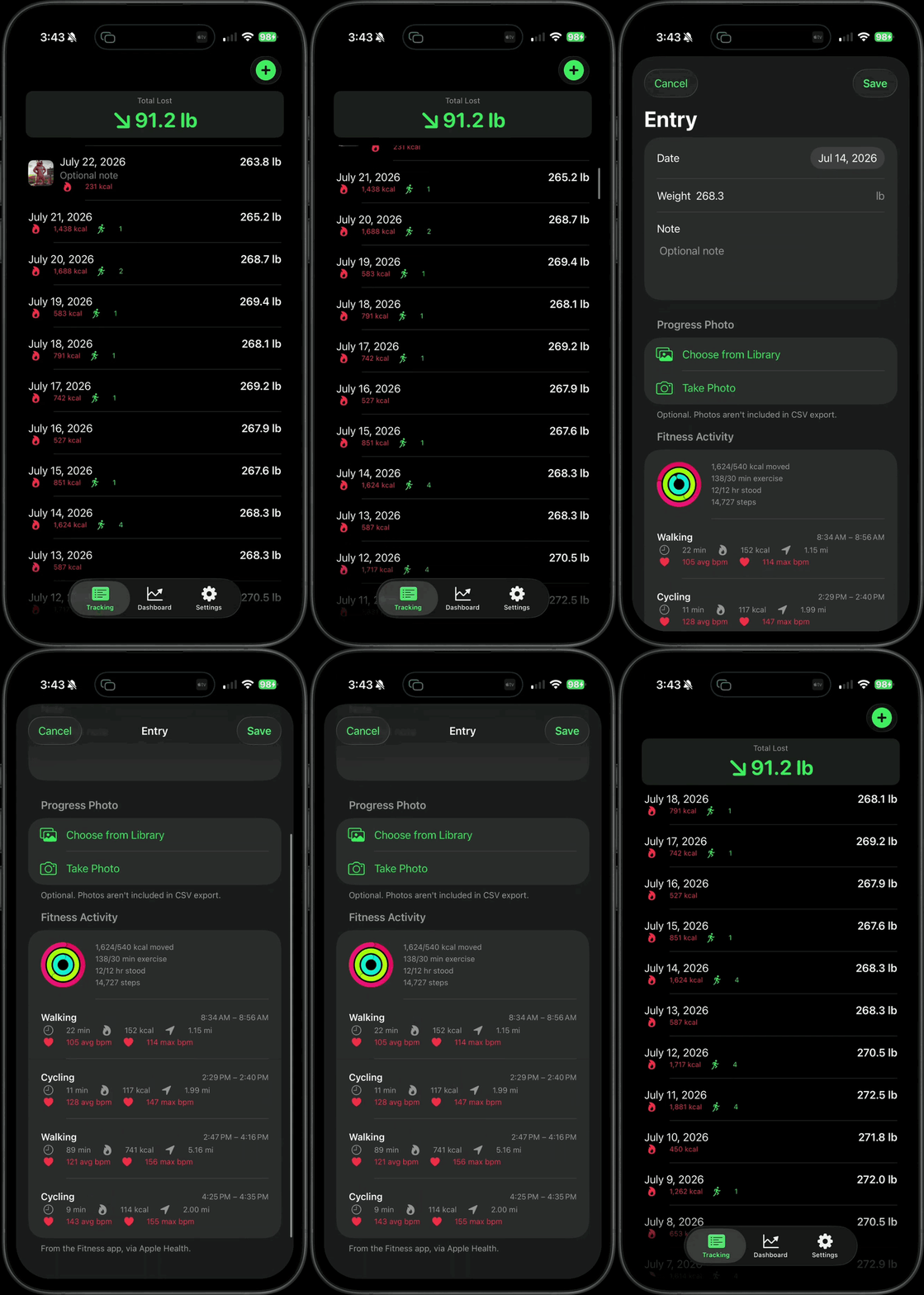
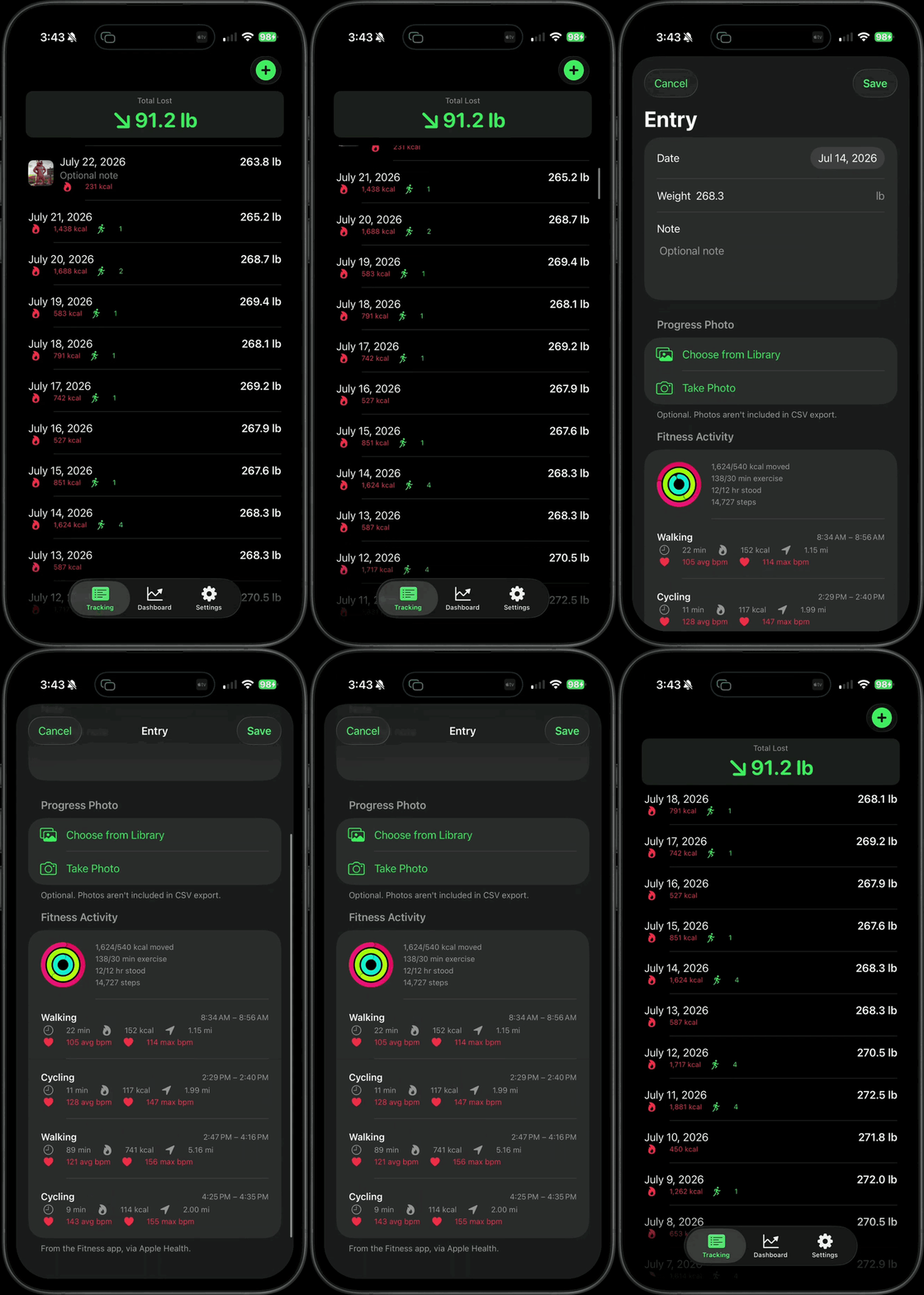
Sync with Apple Fitness to Automatically Display Activity
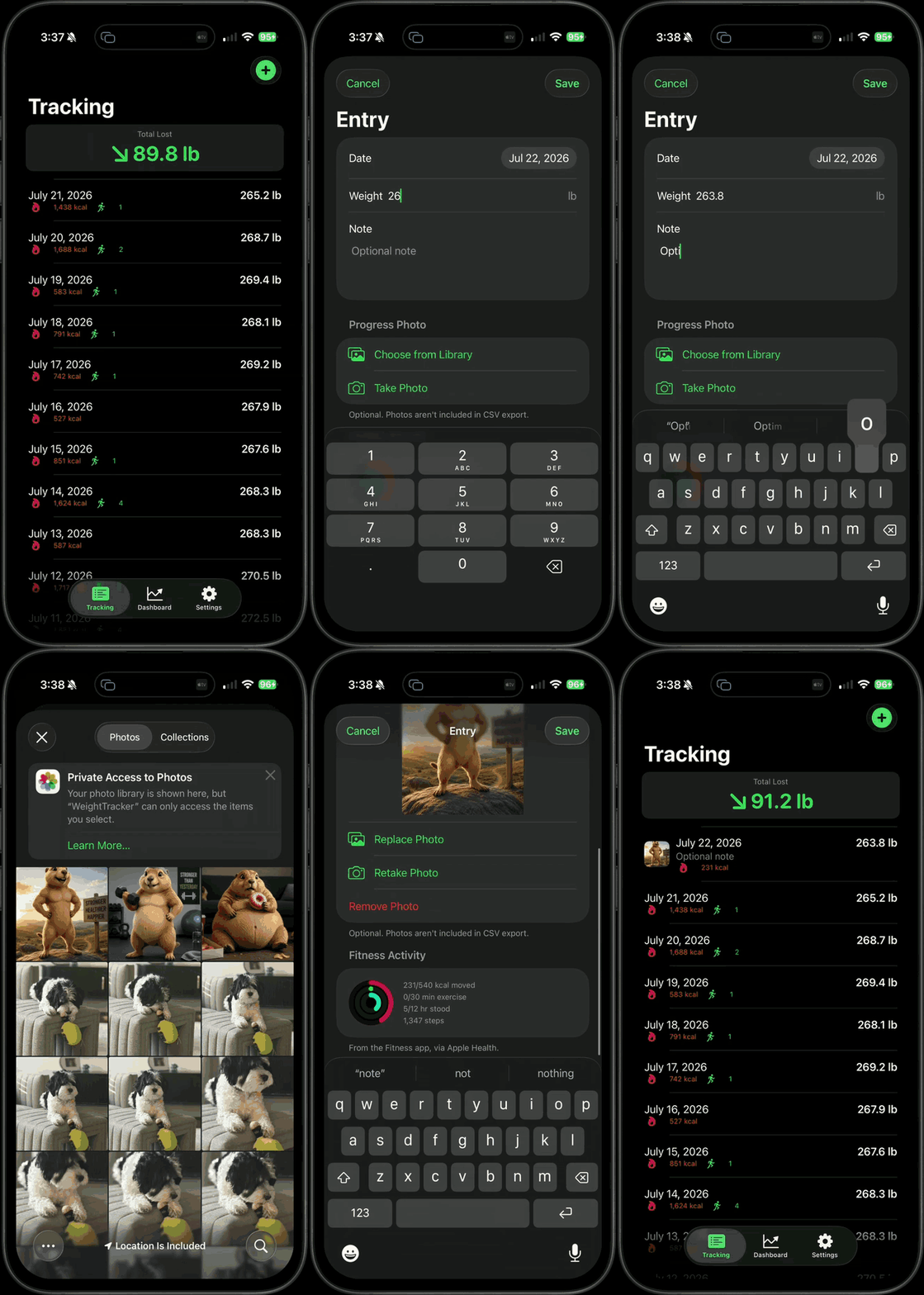
Look back over past entries
See calories burned and number of workouts for all past entries
Click on an entry to edit or view that day's fitness details
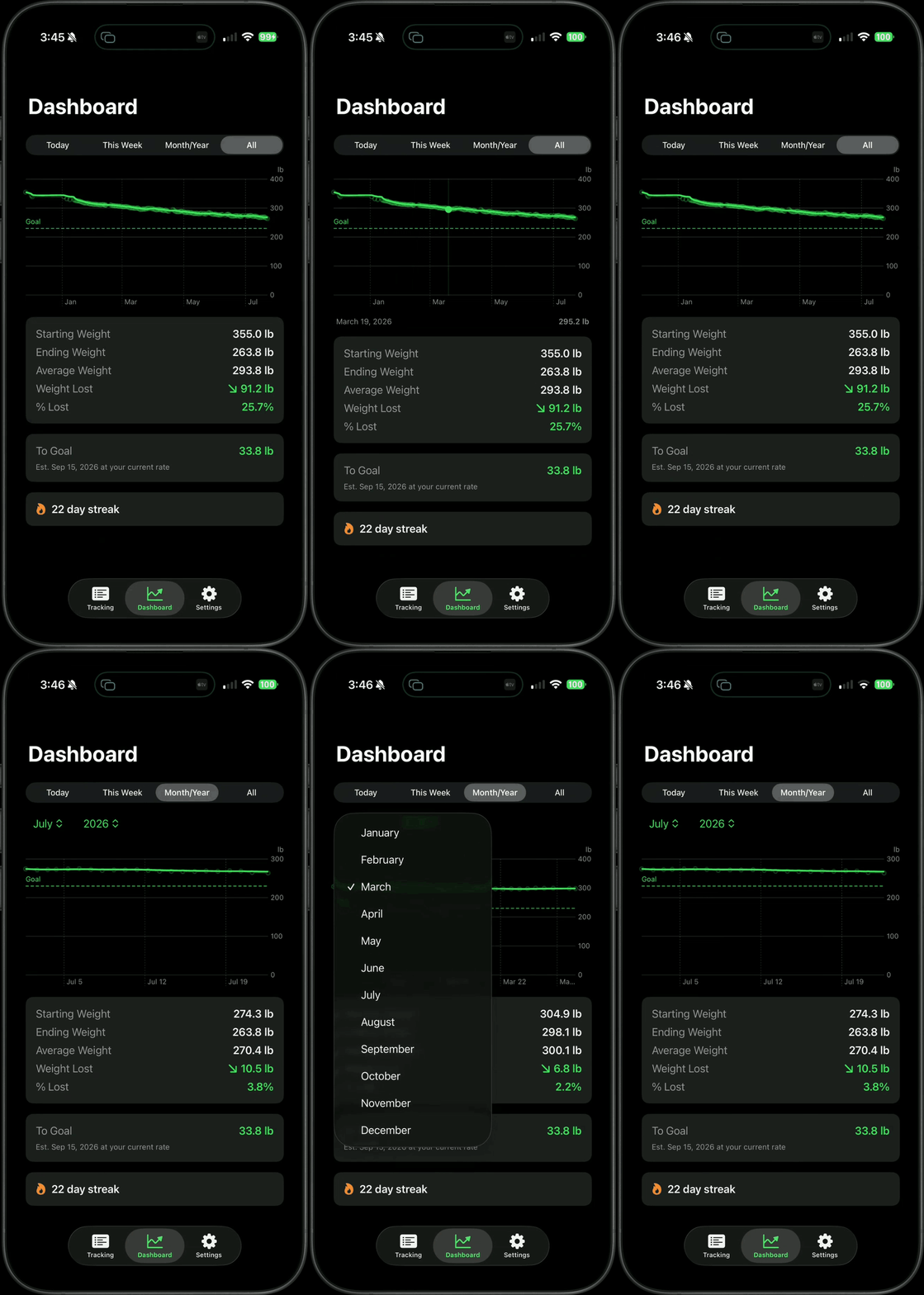
Track Progress with Charts
Daily, weekly and monthly views
See the numbers - including percentage lost or gained
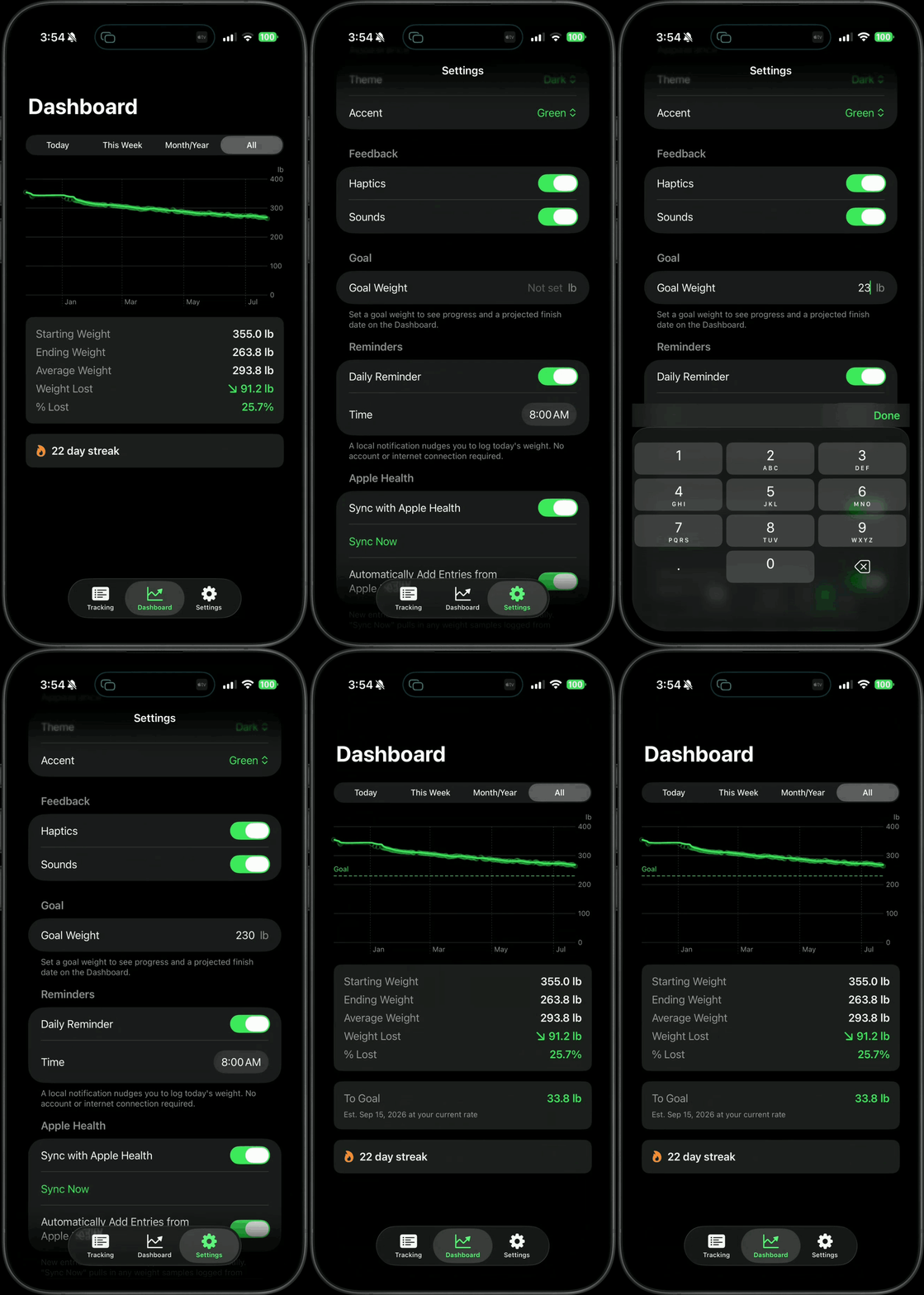
Set and Track Goal Weight
Set or change goal weight
Track progress toward goal
Estimated "goal reached" date
Sync with Apple Health and Fitness
Automatically create entries from smart scale
Automatically append workouts and fitness activity to each entry
*Remember to enable in the settings of
Weightfolio, Apple Health and Apple Fitness apps
Control Your Experience
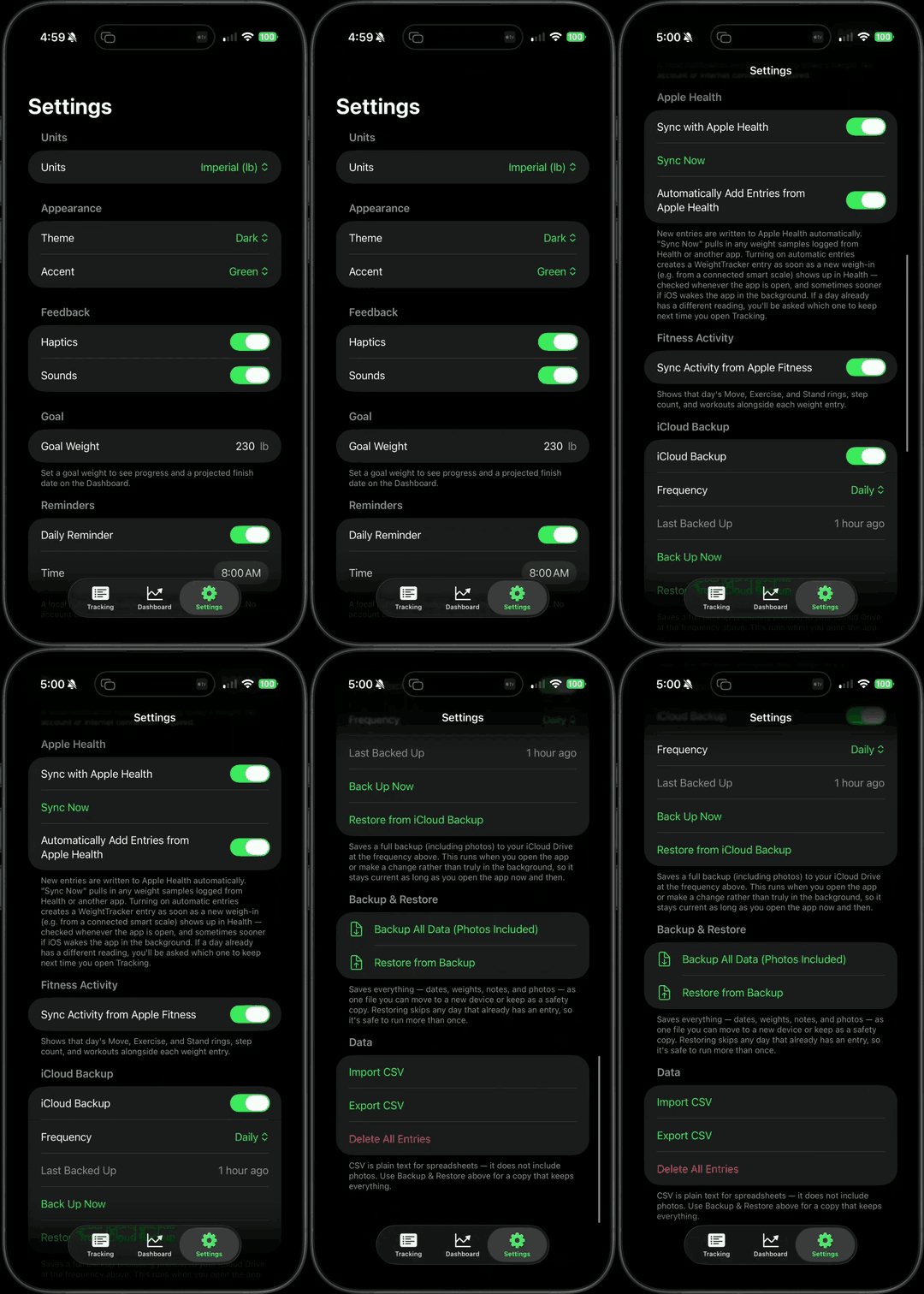
Customized Settings, Including:
Imperial or Metric
Light or Dark Mode
Color Themes
Sound and Haptics
Daily Reminder - Custom Time
Have suggestions or feedback?Need support?Contact us: [email protected]
Privacy Policy
Privacy Policy
Weightfolio | Effective Date: August 6, 2026 | Last Updated: August 6, 2026Weightfolio ("the app") is designed so that your health information stays yours. This policy explains what the app accesses, how it's stored, and what is — and isn't — done with it.1. SummaryWeightfolio does not collect, sell, rent, or share your personal data with any third party. There is no advertising, no analytics, and no tracking of any kind, in this app or across other companies' apps and websites. Everything you enter stays on your device, in your own private iCloud account, or in Apple Health — never on a server operated by the app's developer, because no such server exists.2. Information the app handlesWeight entries. Each entry you log (date, weight, optional note, and optional progress photo) is stored locally on your device using Apple's on-device database technology (SwiftData). If you enable iCloud sync, this data also syncs to your own private iCloud account via Apple's CloudKit, so it's available across your own devices — it is never visible to the developer or anyone else.Progress photos. Photos you optionally attach to an entry are stored the same way as your weight data (on-device, and in your own private iCloud if sync is enabled). They are never uploaded anywhere else, and they are excluded from CSV export.Apple Health data. If you turn on "Sync with Apple Health," the app reads and writes your weight to Apple Health so it stays consistent with your other health apps. If you turn on "Sync Activity from Apple Fitness," the app reads your daily Move/Exercise/Stand activity summary, step count, and workout history (including, where available, calories, distance, and heart rate for each workout) so it can display that alongside your weight entries. Both are off by default and can be turned off at any time in Settings. In accordance with Apple's guidelines, data read from Apple Health is used only to provide this app's features and is never used for advertising, and never shared with third parties, data brokers, or analytics platforms.iCloud Backup. If you turn on "iCloud Backup," a complete copy of your data (including photos) is written as a file to your own private iCloud Drive, so you can restore it after reinstalling the app or on a new device. This file is only ever accessible to you, through your own iCloud account.CSV export/import. You may export your weight history as a CSV file, or import one, entirely on-device. This file is created and read locally and is only shared if you choose to share it yourself (e.g., via Mail or Files).Backup All Date (Photos Included) You may export your weight history as a JSON file, or import one, entirely on-device. Unlike CSV export/import, this file does include your photos. This file is created and read locally and is only shared if you choose to share it yourself (e.g., via Mail or Files).3. What the app does not doThe app does not use cookies, advertising identifiers, or any cross-app/cross-site tracking technology. It has no user accounts, no login, and no server component operated by the developer — so there is nothing for the developer to collect, store, or be breached. No data is used to build a profile of you, and nothing is sold or licensed to advertisers, analytics providers, or data brokers.4. Your control over your dataYou can review, edit, or delete any individual entry at any time. Settings includes a "Delete All Entries" option to permanently erase all locally stored weight data. Turning off HealthKit or iCloud sync stops any further data from being read or written through those channels going forward.5. Children's privacyWeightfolio is not directed at children and does not knowingly collect information from children.6. Changes to This Policy
We may update this Privacy Policy from time to time. Any changes will be posted at this URL with an updated effective date. Your continued use of the App after changes are posted constitutes your acceptance of the updated policy.7. Contact
If you have any questions about this Privacy Policy or the App, please contact:Rusty Nicholson
[email protected]This privacy policy applies to the Weightfolio iOS application.
© 2026 Rusty Nicholson. All rights reserved.